
They just pile up
You screenshot a restaurant from Instagram and never open it again. Good luck finding it among thousands of photos.
SAVED, BUT NEVER FOUND AGAIN
That restaurant you saved from Instagram has been buried in your camera roll ever since. Picnoto reads your screenshots, sorts them into places, products and links, and takes you straight to maps and shopping apps.
For iPhone · 150 free a month · No account needed
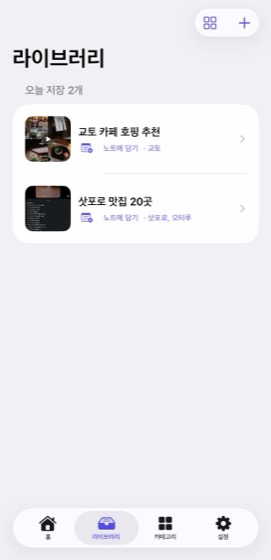
Drop them in.Your notes are already written.
Places to maps, products to shops.Two taps and it opens.
Originals never leave your iPhone.Backup carries them to your next phone.
THE SCREENSHOT GRAVEYARD
You screenshot a restaurant from Instagram and never open it again. Good luck finding it among thousands of photos.
Copy the name, open maps, paste, save. Twenty recommendations means doing all of that twenty times.
Instead of making folders and tagging things, we just take one more screenshot. And the pile keeps growing.
DROP IT IN, IT'S DONE
Picnoto reads the text in your screenshots, sorts it into places, products and links, and groups related items into notes. No categories to set up first, nothing to name one by one.
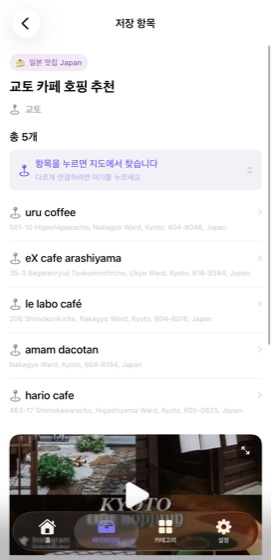
EVERY ITEM KNOWS WHERE TO GO
Picnoto works out what each item is and picks where it should open. Tap it and it opens. Want it to go somewhere else? Change them all at once.
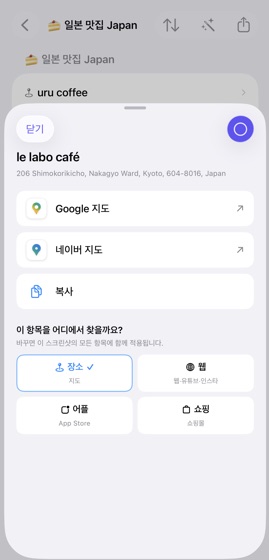
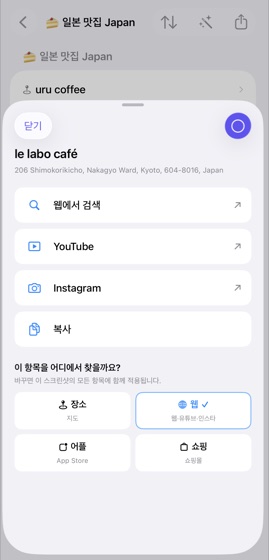
HOW IT WORKS
Send it to Picnoto from Instagram's share sheet. Reels work, and so do the screenshots already sitting in your camera roll.
It reads the text, sorts it into places, products and links, and groups related items into a note.
Tap the café, tap Google Maps, done. No more hunting through search to find it again.
PRIVACY
Original screenshots, the search index and your notes all stay on your iPhone. You can use it without an account, and there are no ads and no tracking.
Read the privacy policySign in and Picnoto backs up your saved items and notes to your account. Switch phones and a single restore brings everything back.
START FREE
150 free analyses a month. Start right away, no account needed.